
• Get started
  • Categories
    • Online shop & ecommerce
    • Shop Design
    • Marketing
    • Search engines (SEO)
    • Products
    • Payment & Delivery
    • Legal issues
    • Merchant stories
  • Search
  • Menu Menu
Efe von Thenen

Simple incorporation of the Trusted Shops Trustbadge

23. October 2014/0 Comments/in Marketing /by

Trust is a key factor in e-commerce: you must be able to convince potential buyers that they can trust you with their money. Thanks to the Trusted Shops Trustbadge, this is now even easier than before.

The new ePages version 6.17, which will gradually be rolled out to our partners starting in the coming months, lets you incorporate the Trusted Shops Trustbadge in your shop with just a few clicks.

Remember that you must be a member of Trusted Shops to be able to use this function.


What is the Trustbadge?

The Trustbadge is a seal of quality that is permanently displayed to your customers at the right-hand side of your shop. When they move the mouse over the Trustbadge, the trustcard opens. This is a small window with additional information that promotes trust, such as customer evaluations for your shop.
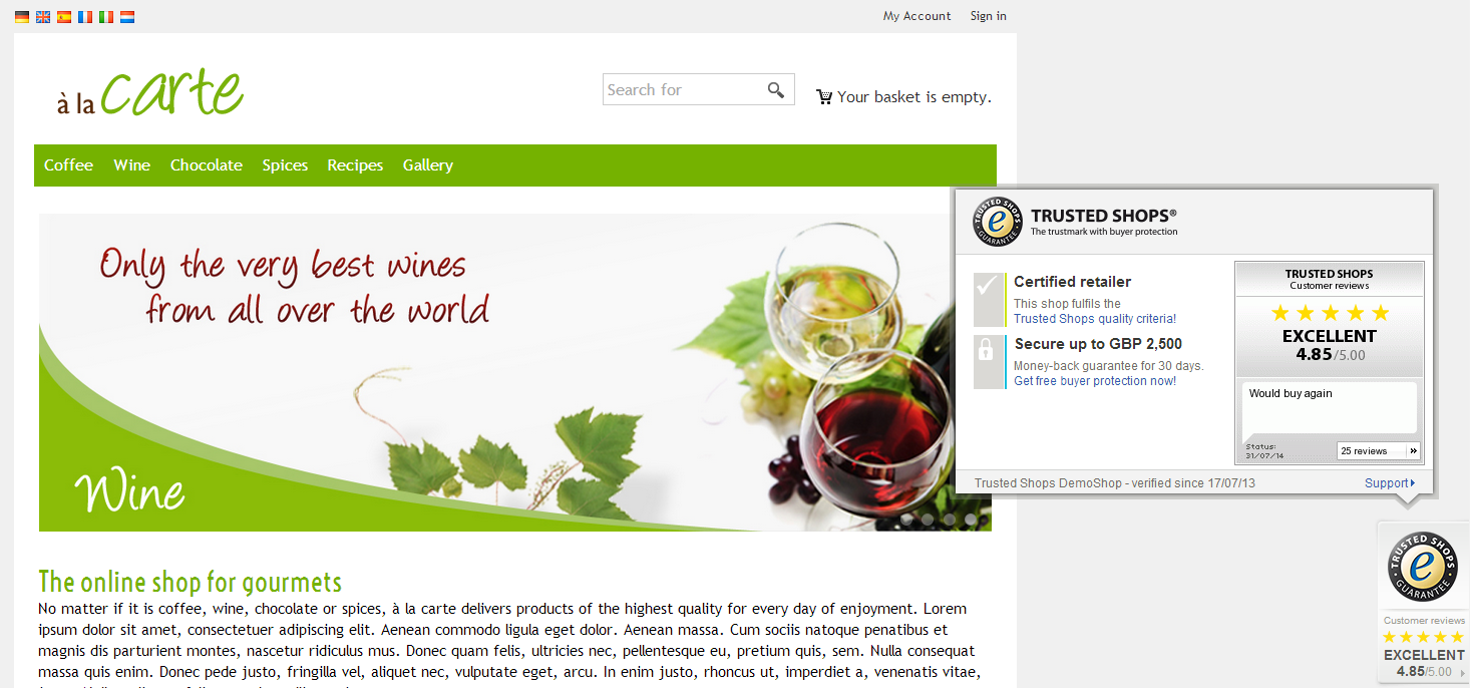
Trust Badge


Where can I see how the Trustbadge is displayed in an online shop?

Visit this page to view an example shop with the Trustbadge already integrated. At the top of the browser window you can experiment with different view options.


How do I incorporate the Trustbadge in my online shop?

  1. In the administration area of your shop, select Marketing >> Trusted Shops certification.
  2. Follow the instructions under This is how to integrate Trusted Shops in your shop.
  3. Under the fifth point, select Display trustbadge.
  4. Save the changes.

The Trustbadge will now appear in your shop.


Where can I find further information about Trustbadge?

Further information is available on the Trusted Shops website.

Please note that these changes might be contained within a later version of ePages 6.17.

+ postsBio
    This author does not have any more posts.
Tags: 6.17, trustbadge, Trusted Shops
Share this entry
  • Share on Facebook
  • Share on WhatsApp
  • Share on LinkedIn
  • Share by Mail
https://blog.epages.com/wp-content/uploads/2021/07/trusted_shops.jpg 314 848 Efe von Thenen https://blog.epages.com/wp-content/uploads/2021/11/logo-epages-blog.svg Efe von Thenen2014-10-23 08:10:402021-10-13 14:46:54Simple incorporation of the Trusted Shops Trustbadge
You might also like
Ya está disponible la edición 2017 del Manual Ecommerce de Ecommerce News.
Tiendas online de éxito en las que inspirarte
Whitepaper: How customer reviews can boost an online business
New ePages version 6.17: Key Features
New design templates for your online shop
Tus pagos más seguros que nunca con Skrill
0 replies

Leave a Reply

Want to join the discussion?
Feel free to contribute!

Leave a Reply Cancel reply

You must be logged in to post a comment.

Search posts

Recent posts

  • Why your online shop might be losing sales – and how you can change that
  • The withdrawal button: Already in your ePages shop, ready for 19 June 2026
  • How Smartsupp turns your ePages shop into a 24/7 sales machine
  • Newsletter marketing with Maileon
  • 5 ready-to-use Black Friday promotions

Categories

  • ePages Direct
  • Legal issues
  • Marketing
  • Merchant stories
  • Online shop & ecommerce
  • Payment & Delivery
  • Products
  • Search engines (SEO)
  • Shop Design
  • Success stories
  • Uncategorized

Tips for a successful start in e-commerce

Checklist: how to start your online shop
Sources for product ideas the ultimate list
Product photos avoiding common mistakes
The best category structure for your shop
Content marketing strategies for your online shop
The 6 key elements of a good seo strategy

© 2026 ePages · Pilatuspool 2 · 20355 Hamburg · Deutschland

Contact ·  Terms & Conditions  · Legal Notice · Data Privacy Protection

  • English
    • Français(French)
    • Deutsch(German)
    • Español(Spanish)
Scroll to top