

Use of ClickandBuy expires in ePages online shops at the end of 2013
 After the 31st of December 2013, the ClickandBuy payment method will no longer be available in the ePages software. Below we will explain who is affected by this change and what will need to be done.
If you are not using ClickandBuy in your ePages online shop, you can lean back and relax as you do not have to do anything. However, if you do belong to the small group of ePages merchants offering ClickandBuy as a payment method in your online shop, then you should do the following:
Your ePages online shop offers ClickandBuy as a payment method
In this case, you and your customers can use ClickandBuy without any restrictions until the 31st December 2013.
But, you should absolutely make sure that you offer your customers more payment options next to ClickandBuy before the end of this year. Most dealers have already integrated several payment methods in their online shops.
To set up alternatives to ClickandBuy, go to the administration area, click Settings >> Payment and follow the steps to activate the respective service.
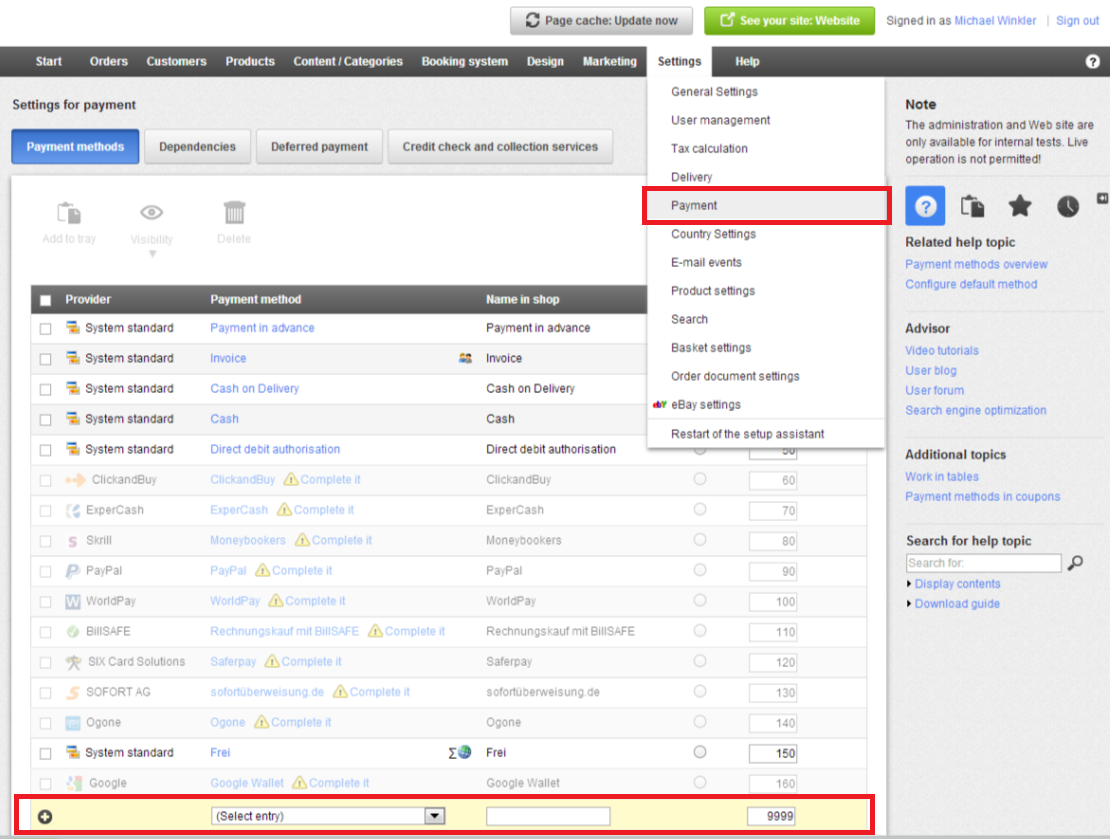
You have the option to disable ClickandBuy before the end of the year. To do this, place a tick mark in Settings >> Payment before ClickandBuy and choose either the option Visibility >> Set not visible or Delete.
If you are showing your clients that they can use ClickandBuy by displaying this provider’s logo in your shop you should remove the respective page element in your shop. Go to the page Design >> Quick design, mark the ClickandBuy logo and use the trash icon.
In the Payment & Delivery section in our blog you will find many articles with detailed instructions on how to integrate new payment methods in your ePages online shop. On our website you will find a list of all payment service providers that are directly connected to the ePages software. Depending on your country and hosting provider, you will find a good selection of payment methods in your administration area.
You already have an ePages online shop, but do not use ClickandBuy
If you already have an ePages shop and do not use ClickandBuy, then you should not activate this service.
ePages has already adjusted the setup page of ClickandBuy: You cannot enter user data any more. This change can already be seen in most merchants’ shops or will be visible shortly.
Do you want to create a new ePages online shop with one of our partners
For new customers, it is easy: Under Settings >> Payment ClickandBuy is no longer among the available payment methods.
There are a number of other services available. Depending on your country and provider, some widely used payment methods can be selected. Explore the list of all payment service providers on our website.






Leave a Reply
Want to join the discussion?Feel free to contribute!